存储插件
详细介绍如何配置和开发 Free FS 的存储插件。
架构概述
Free FS 采用插件化存储架构,支持通过 SPI(Service Provider Interface)机制动态加载存储平台插件。系统默认实现了三个存储平台(阿里云OSS、RustFS、七牛云),这些平台信息存储在数据库中,而具体的插件实现通过 SPI 机制加载。
核心组件
- IStorageOperationService: 存储操作接口,定义了所有存储平台必须实现的方法
- StoragePluginRegistry: 插件注册器,负责通过 SPI 加载和注册插件
- StorageInstanceFactory: 存储实例工厂,根据配置创建存储实例
- StorageInstanceCache: 存储实例缓存,管理实例的生命周期
- StorageConfig: 存储配置类,封装平台配置信息
插件加载流程
- 系统启动时,
StoragePluginRegistry通过 Java SPI 机制扫描并加载所有插件 - 插件以原型实例(Prototype)的形式注册到注册表中
- 当需要创建存储实例时,通过
StorageInstanceFactory调用原型的createConfiguredInstance方法 - 创建的实例会被缓存到
StorageInstanceCache中,避免重复创建
如何快速创建一个存储插件?
方式一:基于 S3 兼容存储(推荐)
如果你的存储平台兼容 S3 API(如 MinIO、腾讯云 COS、AWS S3 等),可以继承 AbstractS3CompatibleStorageService,只需少量代码即可完成实现。
方式二:完全自定义实现
如果存储平台有独特的 API,可以继承 AbstractStorageOperationService,实现所有接口方法。
实现步骤
步骤 1:创建配置类
首先,创建一个配置类来定义你的存储平台需要哪些配置项。
S3 兼容存储示例:
package com.xddcodec.fs.storage.plugin.yourplatform.config;
import com.xddcodec.fs.storage.plugin.core.s3.S3CompatibleConfig;
import lombok.Data;
import lombok.EqualsAndHashCode;
import software.amazon.awssdk.regions.Region;
@Data
@EqualsAndHashCode(callSuper = true)
public class YourPlatformConfig extends S3CompatibleConfig {
public YourPlatformConfig() {
super();
// 设置默认值
setPathStyleAccess(true); // MinIO 需要设置为 true
setRegion(Region.US_EAST_1);
}
// 如果需要额外的配置项,可以在这里添加
// private String customField;
}完全自定义示例:
package com.xddcodec.fs.storage.plugin.yourplatform.config;
import lombok.Data;
@Data
public class YourPlatformConfig {
private String endpoint;
private String accessKey;
private String secretKey;
private String bucket;
// 其他自定义配置项...
}步骤 2:实现存储服务类
S3 兼容存储实现:
package com.xddcodec.fs.storage.plugin.yourplatform;
import com.xddcodec.fs.storage.plugin.core.config.StorageConfig;
import com.xddcodec.fs.storage.plugin.core.s3.AbstractS3CompatibleStorageService;
import com.xddcodec.fs.storage.plugin.yourplatform.config.YourPlatformConfig;
public class YourPlatformStorageServiceImpl
extends AbstractS3CompatibleStorageService<YourPlatformConfig> {
// 原型构造函数(SPI 加载用)
public YourPlatformStorageServiceImpl() {
super();
}
// 配置化构造函数
public YourPlatformStorageServiceImpl(StorageConfig config) {
super(config);
}
@Override
public String getPlatformIdentifier() {
return "your_platform"; // 返回你的平台标识符
}
@Override
protected Class<YourPlatformConfig> getS3ConfigClass() {
return YourPlatformConfig.class;
}
// 可选:自定义配置校验
@Override
protected void customValidateConfig(YourPlatformConfig config) {
// 添加额外的配置校验逻辑
}
// 可选:自定义 S3 客户端配置
@Override
protected void customizeS3Configuration(
software.amazon.awssdk.services.s3.S3Configuration.Builder builder) {
// 自定义 S3 客户端配置
}
}完全自定义实现:
package com.xddcodec.fs.storage.plugin.yourplatform;
import com.xddcodec.fs.framework.common.exception.StorageConfigException;
import com.xddcodec.fs.framework.common.exception.StorageOperationException;
import com.xddcodec.fs.storage.plugin.core.AbstractStorageOperationService;
import com.xddcodec.fs.storage.plugin.core.config.StorageConfig;
import com.xddcodec.fs.storage.plugin.yourplatform.config.YourPlatformConfig;
import lombok.extern.slf4j.Slf4j;
import java.io.InputStream;
@Slf4j
public class YourPlatformStorageServiceImpl
extends AbstractStorageOperationService {
private YourPlatformClient client; // 你的存储平台客户端
private String bucketName;
// 原型构造函数
public YourPlatformStorageServiceImpl() {
super();
}
// 配置化构造函数
public YourPlatformStorageServiceImpl(StorageConfig config) {
super(config);
}
@Override
public String getPlatformIdentifier() {
return "your_platform";
}
@Override
protected void validateConfig(StorageConfig config) {
try {
YourPlatformConfig platformConfig = config.toObject(YourPlatformConfig.class);
if (platformConfig == null) {
throw new StorageConfigException("配置转换失败");
}
// 验证必填字段
if (platformConfig.getEndpoint() == null ||
platformConfig.getEndpoint().trim().isEmpty()) {
throw new StorageConfigException("endpoint 不能为空");
}
// 其他字段验证...
} catch (Exception e) {
log.error("配置验证失败: {}", e.getMessage(), e);
throw new StorageConfigException("存储平台配置错误:" + e.getMessage());
}
}
@Override
protected void initialize(StorageConfig config) {
try {
YourPlatformConfig platformConfig = config.toObject(YourPlatformConfig.class);
// 初始化客户端
this.client = new YourPlatformClient(
platformConfig.getEndpoint(),
platformConfig.getAccessKey(),
platformConfig.getSecretKey()
);
this.bucketName = platformConfig.getBucket();
log.info("{} 客户端初始化成功: endpoint={}, bucket={}",
getLogPrefix(), platformConfig.getEndpoint(), this.bucketName);
} catch (Exception e) {
log.error("客户端初始化失败: {}", e.getMessage(), e);
throw new StorageConfigException("存储平台配置错误:客户端初始化失败");
}
}
@Override
public void uploadFile(InputStream inputStream, String objectKey) {
ensureNotPrototype();
try {
// 实现上传逻辑
client.upload(bucketName, objectKey, inputStream);
log.debug("{} 文件上传成功: objectKey={}", getLogPrefix(), objectKey);
} catch (Exception e) {
log.error("{} 文件上传失败: objectKey={}", getLogPrefix(), objectKey, e);
throw new StorageOperationException("文件上传失败: " + e.getMessage(), e);
}
}
@Override
public InputStream downloadFile(String objectKey) {
ensureNotPrototype();
try {
// 实现下载逻辑
InputStream stream = client.download(bucketName, objectKey);
log.debug("{} 文件下载成功: objectKey={}", getLogPrefix(), objectKey);
return stream;
} catch (Exception e) {
log.error("{} 文件下载失败: objectKey={}", getLogPrefix(), objectKey, e);
throw new StorageOperationException("文件下载失败: " + e.getMessage(), e);
}
}
@Override
public void deleteFile(String objectKey) {
ensureNotPrototype();
try {
// 实现删除逻辑
client.delete(bucketName, objectKey);
log.debug("{} 文件删除成功: objectKey={}", getLogPrefix(), objectKey);
} catch (Exception e) {
log.error("{} 文件删除失败: objectKey={}", getLogPrefix(), objectKey, e);
throw new StorageOperationException("文件删除失败: " + e.getMessage(), e);
}
}
@Override
public void rename(String objectKey, String newFileName) {
ensureNotPrototype();
try {
// 实现重命名逻辑(通常是复制+删除)
String newKey = objectKey.substring(0, objectKey.lastIndexOf('/') + 1) + newFileName;
client.copy(bucketName, objectKey, newKey);
client.delete(bucketName, objectKey);
log.debug("{} 文件重命名成功: {} -> {}", getLogPrefix(), objectKey, newKey);
} catch (Exception e) {
log.error("{} 文件重命名失败: objectKey={}", getLogPrefix(), objectKey, e);
throw new StorageOperationException("文件重命名失败: " + e.getMessage(), e);
}
}
@Override
public String getFileUrl(String objectKey, Integer expireSeconds) {
ensureNotPrototype();
try {
// 实现 URL 生成逻辑
return client.generateUrl(bucketName, objectKey, expireSeconds);
} catch (Exception e) {
log.error("{} 生成文件URL失败: objectKey={}", getLogPrefix(), objectKey, e);
throw new StorageOperationException("生成文件URL失败: " + e.getMessage(), e);
}
}
@Override
public InputStream getFileStream(String objectKey) {
return downloadFile(objectKey);
}
@Override
public boolean isFileExist(String objectKey) {
ensureNotPrototype();
try {
return client.exists(bucketName, objectKey);
} catch (Exception e) {
log.error("{} 检查文件存在失败: objectKey={}", getLogPrefix(), objectKey, e);
throw new StorageOperationException("检查文件存在失败: " + e.getMessage(), e);
}
}
// 实现分片上传相关方法(如果支持)
@Override
public String initiateMultipartUpload(String objectKey, String mimeType) {
ensureNotPrototype();
try {
// 实现分片上传初始化
String uploadId = client.initiateMultipartUpload(bucketName, objectKey, mimeType);
log.debug("{} 初始化分片上传成功: objectKey={}, uploadId={}",
getLogPrefix(), objectKey, uploadId);
return uploadId;
} catch (Exception e) {
log.error("{} 初始化分片上传失败: objectKey={}", getLogPrefix(), objectKey, e);
throw new StorageOperationException("初始化分片上传失败: " + e.getMessage(), e);
}
}
@Override
public String uploadPart(String objectKey, String uploadId, int partNumber,
long partSize, InputStream partInputStream) {
ensureNotPrototype();
try {
// 实现分片上传
String eTag = client.uploadPart(bucketName, objectKey, uploadId,
partNumber, partSize, partInputStream);
log.debug("{} 分片上传成功: objectKey={}, partNumber={}, eTag={}",
getLogPrefix(), objectKey, partNumber, eTag);
return eTag;
} catch (Exception e) {
log.error("{} 分片上传失败: objectKey={}, partNumber={}",
getLogPrefix(), objectKey, partNumber, e);
throw new StorageOperationException("分片上传失败: " + e.getMessage(), e);
}
}
@Override
public java.util.Set<Integer> listParts(String objectKey, String uploadId) {
ensureNotPrototype();
try {
// 实现列举分片
return client.listParts(bucketName, objectKey, uploadId);
} catch (Exception e) {
log.warn("{} 列举分片失败,返回空集合: {}", getLogPrefix(), e.getMessage());
return java.util.Collections.emptySet();
}
}
@Override
public void completeMultipartUpload(String objectKey, String uploadId,
java.util.List<java.util.Map<String, Object>> partETags) {
ensureNotPrototype();
try {
// 实现完成分片上传
client.completeMultipartUpload(bucketName, objectKey, uploadId, partETags);
log.info("{} 分片合并成功: objectKey={}, uploadId={}",
getLogPrefix(), objectKey, uploadId);
} catch (Exception e) {
log.error("{} 分片合并失败: objectKey={}, uploadId={}",
getLogPrefix(), objectKey, uploadId, e);
throw new StorageOperationException("分片合并失败: " + e.getMessage(), e);
}
}
@Override
public void abortMultipartUpload(String objectKey, String uploadId) {
ensureNotPrototype();
try {
// 实现取消分片上传
client.abortMultipartUpload(bucketName, objectKey, uploadId);
log.info("{} 分片上传已取消: objectKey={}, uploadId={}",
getLogPrefix(), objectKey, uploadId);
} catch (Exception e) {
log.error("{} 取消分片上传失败: objectKey={}, uploadId={}",
getLogPrefix(), objectKey, uploadId, e);
throw new StorageOperationException("取消分片上传失败: " + e.getMessage(), e);
}
}
@Override
public void close() {
if (client != null) {
client.close();
}
}
}步骤 3:配置 SPI
在 src/main/resources/META-INF/services/ 目录下创建文件:
文件名: com.xddcodec.fs.storage.plugin.core.IStorageOperationService
文件内容:
com.xddcodec.fs.storage.plugin.yourplatform.YourPlatformStorageServiceImpl注意: 文件名必须是接口的完整类名,文件内容是实现类的完整类名,每行一个。
步骤 4:配置数据库
在 storage_platform 表中添加你的存储平台信息:
INSERT INTO storage_platform (name, identifier, config_scheme, icon, link, is_default, `desc`)
VALUES (
'你的平台名称',
'your_platform', -- 必须与 getPlatformIdentifier() 返回值一致
'[{"label": "Endpoint", "dataType": "string", "identifier": "endpoint", "validation": {"required": true}}, {"label": "Access-Key", "dataType": "string", "identifier": "accessKey", "validation": {"required": true}}, {"label": "Secret-key", "dataType": "string", "identifier": "secretKey", "validation": {"required": true}}, {"label": "Bucket", "dataType": "string", "identifier": "bucket", "validation": {"required": true}}]',
'icon-your-platform',
'https://your-platform.com',
0,
'你的平台描述'
);config_scheme 字段说明:
config_scheme 是一个 JSON 数组,用于定义前端动态表单。每个配置项包含以下字段:
label: 显示标签dataType: 数据类型(string、number、boolean 等)identifier: 配置项标识符(对应配置类中的字段名)validation: 验证规则required: 是否必填- 其他验证规则...
示例:
[
{
"label": "Endpoint",
"dataType": "string",
"identifier": "endpoint",
"validation": {
"required": true
}
},
{
"label": "Access-Key",
"dataType": "string",
"identifier": "accessKey",
"validation": {
"required": true
}
},
{
"label": "Secret-key",
"dataType": "string",
"identifier": "secretKey",
"validation": {
"required": true
}
},
{
"label": "Bucket",
"dataType": "string",
"identifier": "bucket",
"validation": {
"required": true
}
}
]步骤 5:添加依赖
在你的插件项目中添加必要的依赖:
Maven 依赖(S3 兼容存储):
<dependencies>
<!-- Free FS 存储插件核心 -->
<dependency>
<groupId>com.xddcodec.fs</groupId>
<artifactId>fs-storage-plugin-core</artifactId>
<version>${fs.version}</version>
</dependency>
<!-- AWS S3 SDK(S3 兼容存储需要) -->
<dependency>
<groupId>software.amazon.awssdk</groupId>
<artifactId>s3</artifactId>
<version>2.20.0</version>
</dependency>
</dependencies>步骤 6:集成到主项目
插件模块开发完成后,需要将其集成到主项目中,以便系统能够加载和使用该插件。
6.1 在 fs-dependencies 中配置版本
在 fs-dependencies 模块的 pom.xml 中添加插件的版本管理:
<dependencyManagement>
<dependencies>
<!-- 其他依赖管理... -->
<!-- 你的存储插件 -->
<dependency>
<groupId>com.xddcodec.fs</groupId>
<artifactId>storage-plugin-yourplatform</artifactId>
<version>${revision}</version>
</dependency>
</dependencies>
</dependencyManagement>说明:
fs-dependencies模块用于统一管理所有模块的版本,确保版本一致性。
6.2 在 storage-plugin-boot 中添加依赖
在 storage-plugin-boot 模块的 pom.xml 中添加你的插件依赖:
<dependencies>
<!-- 存储插件核心 -->
<dependency>
<groupId>com.xddcodec.fs</groupId>
<artifactId>storage-plugin-core</artifactId>
</dependency>
<!-- 本地存储插件 -->
<dependency>
<groupId>com.xddcodec.fs</groupId>
<artifactId>storage-plugin-local</artifactId>
</dependency>
<!-- 阿里云OSS插件(可选,根据需要添加) -->
<dependency>
<groupId>com.xddcodec.fs</groupId>
<artifactId>storage-plugin-aliyunoss</artifactId>
</dependency>
<!-- RustFS插件(可选,根据需要添加) -->
<dependency>
<groupId>com.xddcodec.fs</groupId>
<artifactId>storage-plugin-rustfs</artifactId>
</dependency>
<!-- 你的存储插件(可选,根据需要添加) -->
<dependency>
<groupId>com.xddcodec.fs</groupId>
<artifactId>storage-plugin-yourplatform</artifactId>
</dependency>
</dependencies>重要提示:
- 插件依赖是可选的,可以根据实际需要添加或移除
- 如果不添加插件依赖,即使插件已开发完成,系统也无法加载该插件
- 添加依赖后,需要重新编译和打包项目
6.3 验证集成
完成上述配置后:
-
重新编译项目:
mvn clean install -
检查依赖:确认插件 JAR 文件已包含在
storage-plugin-boot模块的 classpath 中。 -
启动应用:启动应用后,检查日志确认插件已加载:
开始加载存储插件... 注册存储插件: your_platform 存储插件加载完成,共加载 X 个插件: [...]
实现示例
示例 1:RustFS(S3 兼容)
RustFS 是一个基于 S3 兼容协议的存储平台,实现非常简单:
package com.xddcodec.fs.storage.plugin.rustfs;
import com.xddcodec.fs.framework.common.enums.StoragePlatformIdentifierEnum;
import com.xddcodec.fs.storage.plugin.core.config.StorageConfig;
import com.xddcodec.fs.storage.plugin.core.s3.AbstractS3CompatibleStorageService;
import com.xddcodec.fs.storage.plugin.rustfs.config.RustFsConfig;
public class RustFsStorageServiceImpl
extends AbstractS3CompatibleStorageService<RustFsConfig> {
public RustFsStorageServiceImpl() {
super();
}
public RustFsStorageServiceImpl(StorageConfig config) {
super(config);
}
@Override
public String getPlatformIdentifier() {
return StoragePlatformIdentifierEnum.RUSTFS.getIdentifier();
}
@Override
protected Class<RustFsConfig> getS3ConfigClass() {
return RustFsConfig.class;
}
}示例 2:阿里云 OSS(完全自定义)
阿里云 OSS 使用自己的 SDK,需要完全自定义实现,可以参考 AliyunOssStorageServiceImpl 的实现。
配置 Schema(可选)
接口中提供了 getConfigSchema() 方法,用于返回配置的 JSON Schema。目前系统主要从数据库的 config_scheme 字段读取配置 Schema,但如果你需要动态生成 Schema,可以重写此方法:
@Override
public String getConfigSchema() {
// 返回 JSON Schema 字符串
return "[{\"label\": \"Endpoint\", \"dataType\": \"string\", \"identifier\": \"endpoint\", \"validation\": {\"required\": true}}]";
}注意:目前系统优先使用数据库中的
config_scheme字段,此方法主要用于特殊场景。
注意事项
-
平台标识符唯一性:
getPlatformIdentifier()返回的标识符必须在整个系统中唯一,且必须与数据库中的identifier字段一致。 -
原型实例:插件类必须提供无参构造函数(原型构造函数),用于 SPI 加载。原型实例只用于获取 Schema 和创建新实例,不能执行实际的存储操作。
-
配置化实例:通过
createConfiguredInstance方法创建的实例才是真正用于业务操作的实例。 -
资源管理:如果插件使用了需要关闭的资源(如 HTTP 客户端、连接池等),必须在
close()方法中正确释放。 -
异常处理:所有方法都应该抛出
StorageOperationException或StorageConfigException,以便系统统一处理。 -
日志记录:使用
getLogPrefix()方法获取日志前缀,便于追踪问题。 -
线程安全:存储实例可能被多个线程并发访问,确保实现是线程安全的。
测试插件
完成插件开发和集成后,按以下步骤测试:
-
编译项目:在主项目根目录执行编译命令:
mvn clean install确保插件模块编译成功,并且已正确集成到
storage-plugin-boot模块中。 -
验证依赖:检查
storage-plugin-boot模块的依赖中是否包含你的插件:mvn dependency:tree -pl storage-plugin-boot | grep storage-plugin-yourplatform -
启动应用:启动应用后,检查日志中是否有插件加载信息:
开始加载存储插件... 注册存储插件: your_platform 存储插件加载完成,共加载 X 个插件: [...]如果插件未出现在日志中,请检查:
fs-dependencies中是否配置了版本管理storage-plugin-boot中是否添加了依赖- SPI 配置文件路径和内容是否正确
-
验证功能:在管理后台创建存储配置,测试上传、下载等功能。
使用已开发的插件
插件开发完成并完成集成配置后(参考步骤 6:集成到主项目),需要完成以下步骤才能在系统中使用:
步骤 1:验证插件加载
启动应用后,检查日志确认插件已成功加载:
开始加载存储插件...
注册存储插件: your_platform
存储插件加载完成,共加载 X 个插件: [local, aliyun_oss, rustfs, your_platform]如果插件未出现在日志中,请检查:
- SPI 配置文件路径和内容是否正确
- JAR 文件是否在 classpath 中
- 插件类是否实现了
IStorageOperationService接口
步骤 2:配置数据库
在 storage_platform 表中添加你的存储平台信息(如果尚未添加):
INSERT INTO storage_platform (name, identifier, config_scheme, icon, link, is_default, `desc`)
VALUES (
'你的平台名称',
'your_platform', -- 必须与 getPlatformIdentifier() 返回值一致
'[{"label": "Endpoint", "dataType": "string", "identifier": "endpoint", "validation": {"required": true}}, {"label": "Access-Key", "dataType": "string", "identifier": "accessKey", "validation": {"required": true}}, {"label": "Secret-key", "dataType": "string", "identifier": "secretKey", "validation": {"required": true}}, {"label": "Bucket", "dataType": "string", "identifier": "bucket", "validation": {"required": true}}]',
'icon-your-platform',
'https://your-platform.com',
0,
'你的平台描述'
);注意:
identifier字段必须与插件中getPlatformIdentifier()方法的返回值完全一致。
步骤 3:在页面中添加配置
-
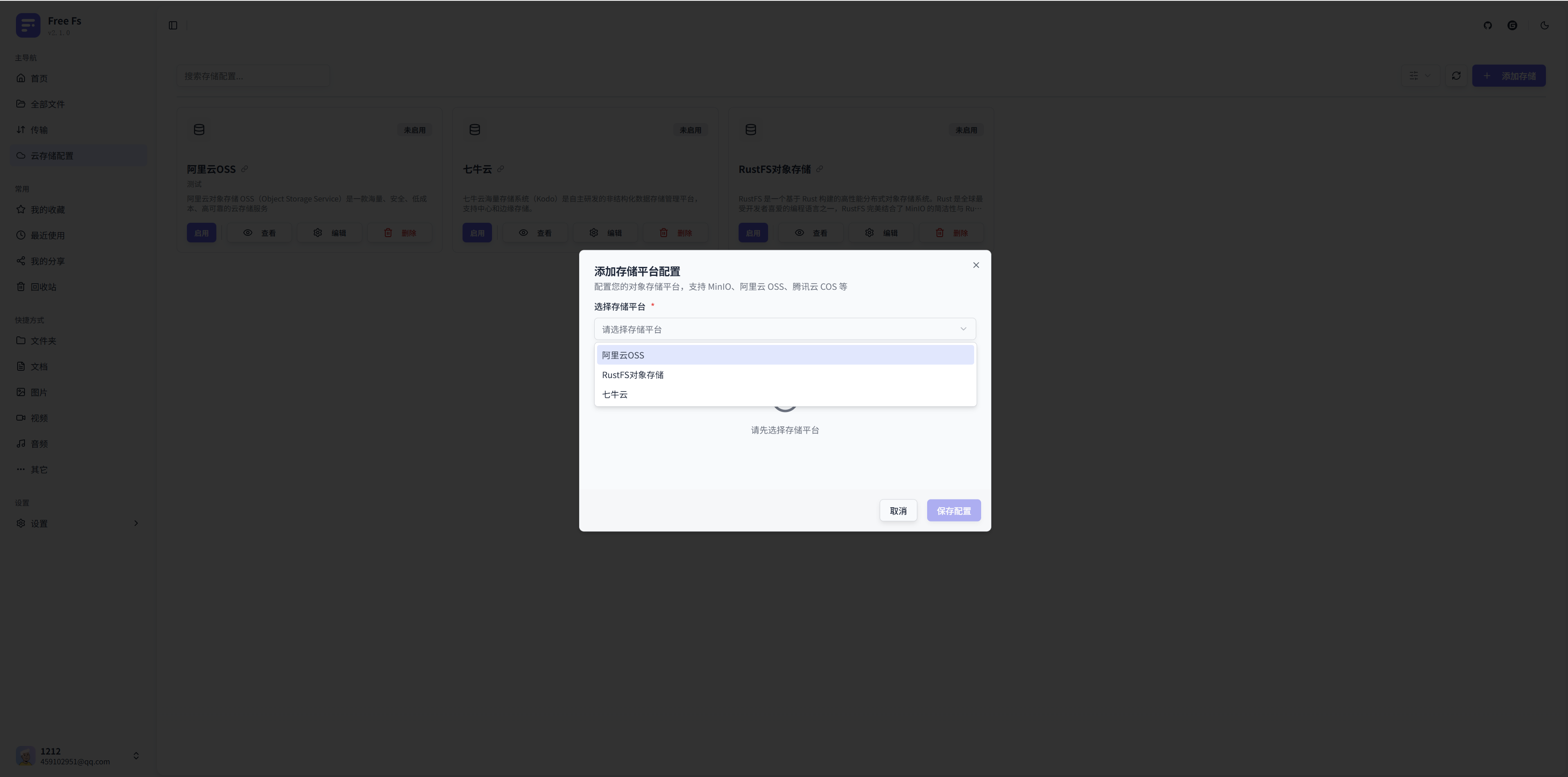
访问存储平台管理页面:登录系统后,进入"存储配置"页面。
-
添加新配置:点击"添加配置"按钮,打开配置对话框。
-
选择存储平台:在下拉菜单中选择你开发的存储平台(如 "你的平台名称")。

-
填写配置信息:根据
config_scheme中定义的字段,填写相应的配置项:- Endpoint:存储服务的端点地址
- Access-Key:访问密钥
- Secret-key:密钥
- Bucket:存储桶名称
- 其他自定义配置项...
-
添加备注(推荐):为配置添加备注,便于识别(如"生产环境"、"测试环境"等)。
-
保存配置:点击"保存配置"按钮,系统会验证配置并创建存储实例。
步骤 4:启用配置
配置保存成功后,你可以:
-
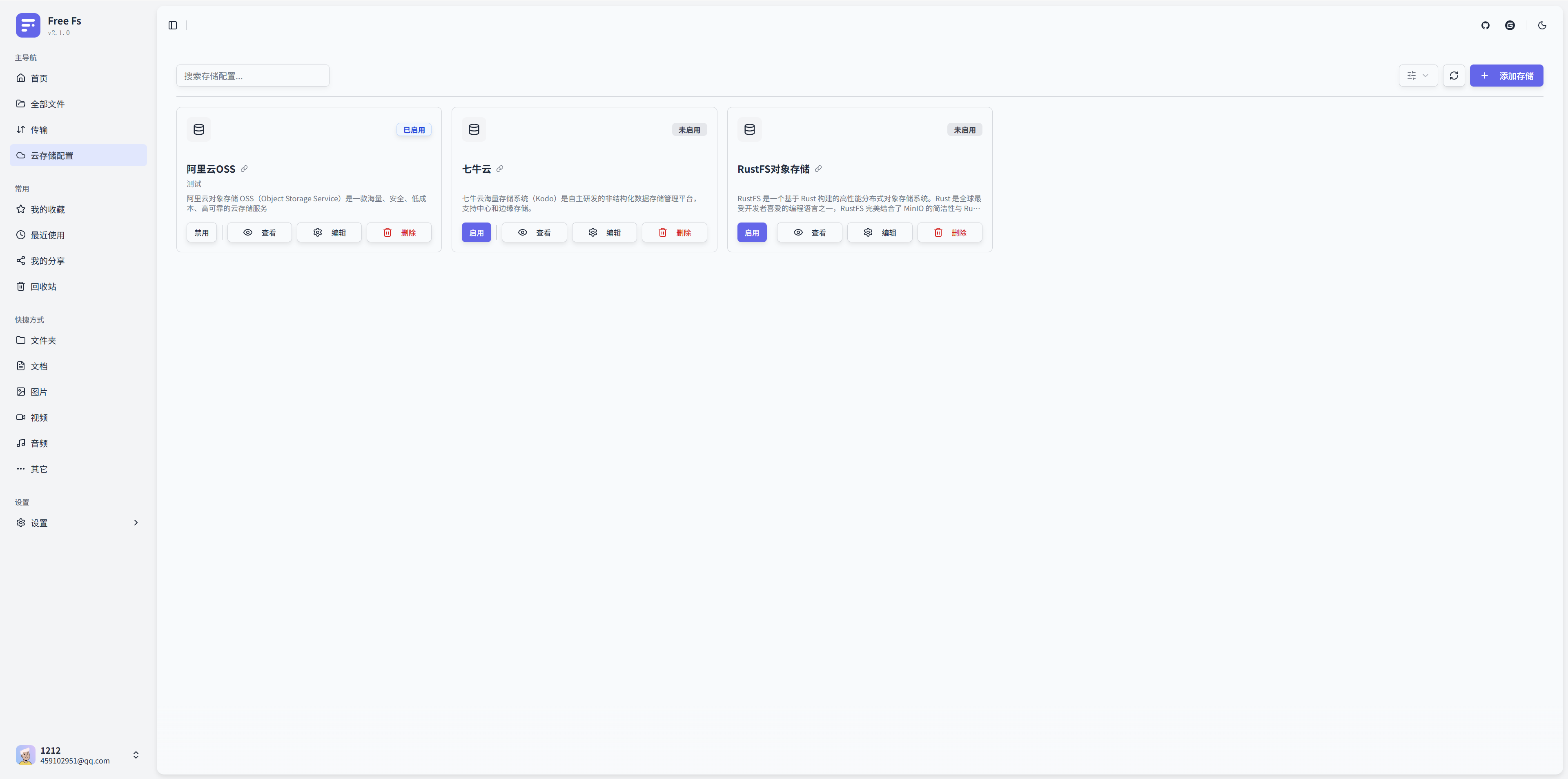
查看配置列表:在"我的存储配置"区域可以看到新添加的配置卡片,状态显示为"已禁用"。
-
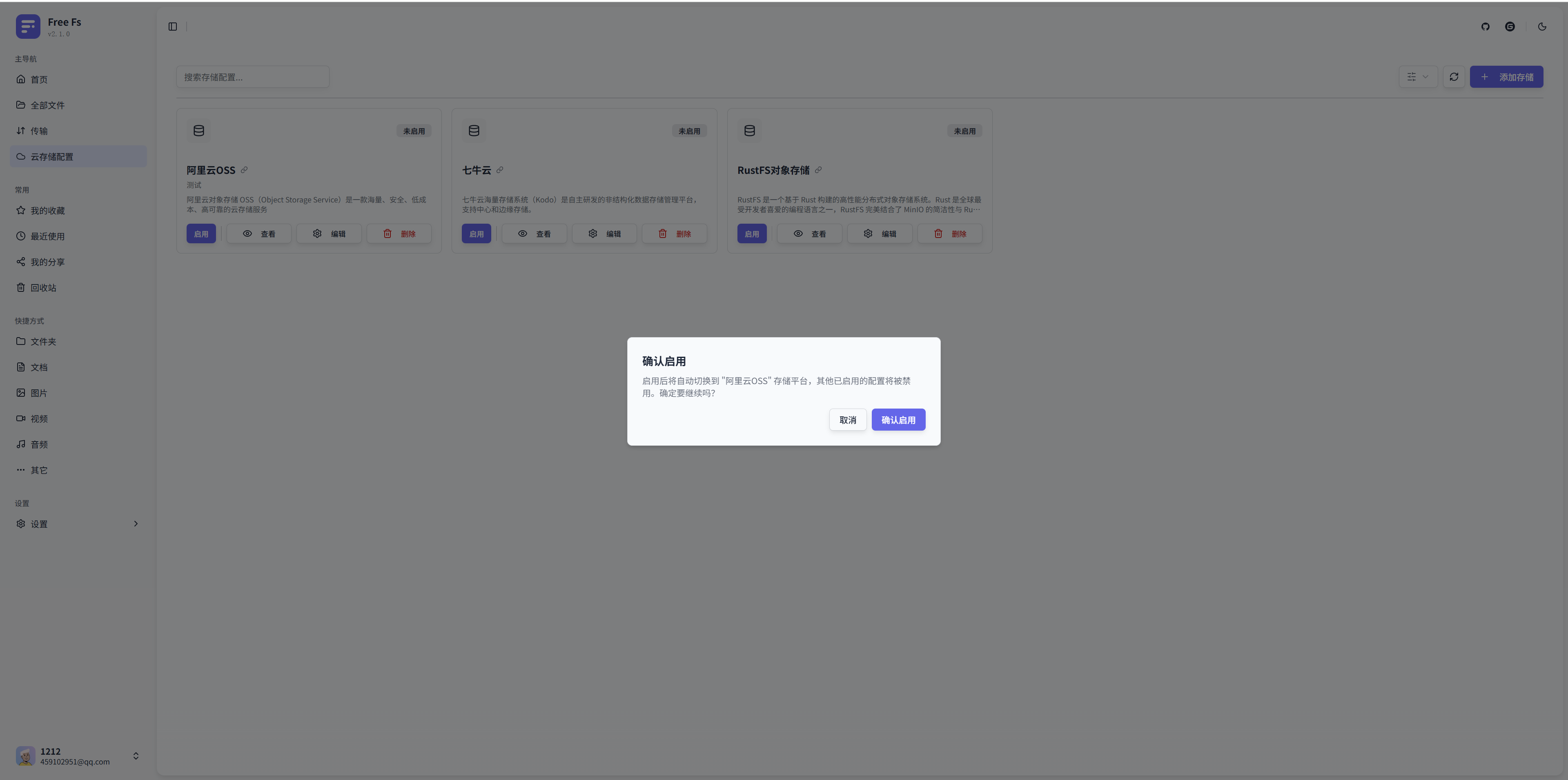
启用配置:点击配置卡片上的"启用"按钮(电源图标),系统会:
- 验证配置的有效性
- 创建存储实例并缓存
- 将当前存储平台切换为该配置
-
确认切换:启用成功后:
- 配置卡片状态变为"已启用"
- 右上角显示当前启用的存储平台
- 所有文件操作将使用该存储平台

步骤 5:切换存储平台

- 启用其他配置:点击其他配置的"启用"按钮,系统会自动禁用当前配置并启用新配置。
- 快速切换:点击右上角的存储平台切换按钮,可以快速返回存储配置页面进行切换。
重要提示:
- 同时只能有一个存储配置处于启用状态
- 如果都不启用,则平台默认使用本地存储插件
- 切换存储平台不会迁移已有文件,新上传的文件将存储到新平台
- 平台目前以单独的Bucket作为独立的存储管理单元,也就是说同一个存储平台的配置可以有多个不同的Bucket,平台请求头会传递已启用配置的唯一id
- 建议在切换前备份重要数据
常见问题
Q: 插件已加载,但在下拉列表中看不到?
A: 检查数据库中的 storage_platform 表,确认:
identifier字段与插件中的getPlatformIdentifier()返回值一致- 记录已正确插入数据库
Q: 配置保存失败?
A: 检查:
- 配置项是否填写完整(必填项不能为空)
- 配置值格式是否正确
- 网络连接是否正常(如 endpoint 是否可访问)
- 查看应用日志中的错误信息
Q: 启用配置后无法上传文件?
A: 检查:
- 存储实例是否创建成功(查看日志)
- 配置的访问凭证是否正确
- 存储桶是否存在且有写入权限
- 网络连接是否正常